The Stockholm Tunnelbana is full of visual surprises if you know how to look for them. It’s amazing to me that so many people breeze through these elaborately built stations on a daily basis without even a second glance. Then again, we as artists tend to look at the world in a completely different way. Having an artistic eye gives us the ability to find interesting things in everyday subjects; subjects that most people just overlook and/or classify as mundane.

So while most see metro stations only as forms of transportation or simple solutions to get from point A to point B, I see them as compositions and angles, colors and textures, moods and emotions. I also like to think that I’ve inspired people —especially in Stockholm— to see these stations as what they were intended to be: Works of art.

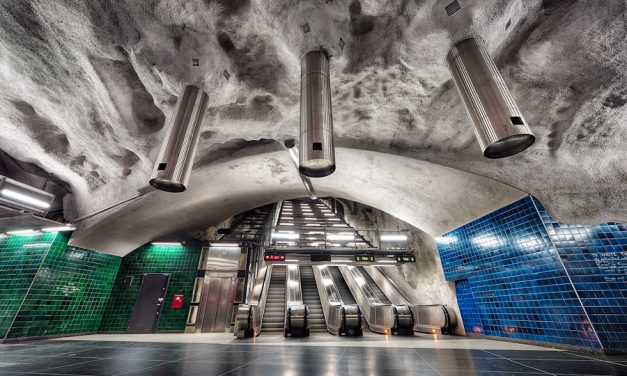
This amazing work of nonsymmetrical art is Station Universitetet on the Red Line.

Technical Mumbo Jumbo

Camera: Nikon D800
Lens: 14-24 f/2.8 – Shot at 14mm
Aperture: f/8
ISO: 100
5 Exposures: ? / 0.6 / 1.3 / 2.5 / 5

I know that Photomatix gets a bad wrap now and them but there are a few things that it handles consistently well. One of those things is detail enhancement. So while the DR (dynamic range) in this scene is a bit limited, the wealth of textures is not. And my goal was to punch up the textures as much as possible.

In Photoshop, the Photomatix result was first blended with the original exposure. Then, parts of exposures -2 & +1 were also blended in to bring back some areas of extreme shadow and extreme light.

I applied a slight increase of Tonal Contrast with NIK Color Effects Pro and selectively sharpened the image with NIK Sharpener. Additional selective color, saturation and contrast adjustments were applied using some quick and dirty Luminance Masking.

The 14mm distortion was removed in Adobe Lightroom 4 using the matching lens profile.
 
An amazing work of nonsymmetrical art. Station Universitetet - Stockholm Tunnelbana
 

Recent Publication || Photoshop User Magazine || July / August 2012

Photoshop User Magazine Traveling Light Article Elia Locardi
I was recently published in Photoshop User Magazine in an article about Traveling Light as a Photographer. They were also kind enough to let me post the entire page.

The funny part is that at the time I wrote this article, I had flown nearly 400k miles with my Think Tank Bags, Cameras, and Computer Gear. Looking back now, that was just shy of 100k miles ago. Wow does time fly when you fly. (couldn’t resist the lame joke) ;)

It’s also worth noting that I’ve added some new gear to this list but I’ve kept the same bag configuration. When I planned out my 100% mobile lifestyle, I knew that my collection of gear would evolve over time. I made sure to purchase bags that were fully modular and that could be reconfigured on the fly.

National Association of Photoshop Professionals (NAPP) and Photoshop User Magazine are great resources for photographers and designers.

Digital Photo Storage For A Full Time Traveling Photographer

As a full time travel photographer, managing hard drive and storage space on the road can be tricky. If you travel and shoot as much as I do, the files are going to add up fast. While it’s typical to have a large storage backup solution at home, my travel schedule doesn’t allow me that luxury.

In fact, I don’t even have a home anymore. My wife and I recently sold all of our possessions in exchange for a location independent life on the road. Since we frequently circle the globe via various airlines, our packed bags don’t have room for large scale hard disk solutions. To make a long story short, my storage backup system must be light, mobile, and reliable.

My current mobile hard drive solution is 2 2tb Western Digital My Passports. Previously I was using 2 1.5tb Seagate GoFlex Drives. Both manufacturers create a good (and reliable) product. Both Seagate and Western Digital both support USB 3.0 which significantly speeds up file transfers.

Dual Hard Drive Backup

Backup for Full Time Travel Photography - Picture of Hard Drive

Keep in mind that there are many ways to keep your files organized and by no means is my way the only way. The best advice I can give you is to find something simple that makes sense to you. Most importantly, pick a process that you will stick to! If you don’t stay current with your backup procedure then what’s the point, right?

Saying that, I have a really simple system for organizing my files across multiple Lightroom catalogs and I’m always clearing space by deleting unused files. I routinely comb through my catalogues getting rid of anything that I won’t use or don’t need. That way, I can maximize the available storage as my catalogue of photos continues to grow. In the long run this will help keep it contained on as few hard drives as possible.

I also have a quick system for keeping track of modified files that need to be backed up. Since I do all of my backup manually, this method helps me stay efficient. It’s quick, simple, and it’s served my purposes perfectly.

The green folders contain works in progress that require backup. The blue folders are cold and have no activity. They are currently fully backed up and up to date. If I change anything, I flag it green. Simple.

Every few days, depending on my activity, I back up Hard Drive 1 to Hard Drive 2 in order to keep everything fully (and double) backed up. Every few months, depending on how many new shots I accumulate, I purchase a third hard drive, sync it, and ship it to a friend to hold for me. That way if I lose the data on both my mobile drives, I still have a reasonably updated copy somewhere.

Dance of Light || Announcing: HDR Workshop Singapore

From the first time I visited Singapore, I knew that it was going to become one of my favorite places for photography. Not only is it unique and beautiful city, but it’s also home to a wonderful community of very talented photographers. It’s truly a rare visual paradise that begs to be photographed. It’s no surprise that it’s quickly becoming one of my favorite destinations of all time. I’m literally drawn to it like a moth to a flame, or in this case, a moth to an awesome laser show. :)

That’s why I’m extremely pleased to announce my upcoming Secrets of HDR & Post-processing Workshop, on June 9th in Singapore. I’ll be covering my complete production workflow in an all day class followed by a guided “hands-on” photo walk around The Marina Bay Area. If you’re in the area and want to learn all about how I create my photographs, I’d love to have you!
Dance of Light - Singapore

Post-processing Before and After

Camera Info (Main Scene):
Nikon D700 / Nikon 24-70 Lens
ISO: 200 / 26mm / f/4
3 Exposure Brackets: -2, -1, 0

Camera Info (Laser Show):
ISO: 200 / 26mm / f/2.8
4 Single Exposures / Shutter: 2 Seconds

Post-processing
All 7 exposures (3 for main scene and 4 exposures for the laser show) were blended in Photoshop. Some selective contrast and sharpening was also applied. Since the camera was locked at 26mm, everything lined up perfectly.


Congratulations to the Winners of our Photowalk Singapore Contest and a special thanks to everyone who participated.

First Place Winner: Azrin Muhd

Congratulations to Azrin Muhd who will receive a FREE seat at our Photography Workshop June 9th.

 Azrin Muhd A Different Reflection

©2012 Azrin Muhd

Second Place Winner: Jonathan Chiang

Singapore Photowalk Second Place Winner Jonathan Chiang Polar Gate

©2012 - Jonathan Chiang

Third Place Winner: Jacobs Chong

Singapore Photowalk Third Place Winner Jacobs Chong Garden Of Light

©2012 - Jacobs Chong

Hyangwon Pavilion – A Rare Sky Replacement

While in Seoul, I visited the Hyangwon Pavilion inside The Gyeongbok Palace, and I was really excited to shoot there. Unfortunately, when I arrived at the pavilion, the sun was completely tucked away behind a heavily clouded and overcast sky. Since the lighting was totally flat, I went back 2 days later. This time, the lighting was nice but the sky wasn’t very appealing. Once I got into Post-Processing, I knew that neither version was going to work out. So, to sum things up, what you’re actually seeing is a composite of 2 different days, shot within a few meters of the same location. Specifically, you’re seeing the sky from day one and the foreground elements from day two. Does that make sense? I’ll elaborate. :)

Photo & Video Sharing by SmugMug


Post-Processing Before and After

Now, I rarely swap out skies but in this case I felt it was an absolute must. It’s not because I’m against sky replacement or anything. It’s just that I can usually work with the sky as is and I’m a firm believer of the phrase, “If it’s not broke, don’t fix it… But with this scene, there was so much detail in the foreground that I had to figure out a way of muting the sky a little bit, and making it less distracting. The cloudy sky form day one turned out to be perfect and it added a nice subtle contrast to the Lily pads on the louts pond.

The main objective of the color correction was to highlight the Pavilion itself, in order to give it some extra separation from the background. Then, taking the color separation one step further, I also added a slight hue shift to the green trees in the background, giving them a more yellowish color.


(move the slider to compare before and after)
Hyangwon Pavilion - (Seoul, South Korea)

Daily Banana – Path Of Angels

Though Rome is well known for it’s bridges, Ponte Sant’Angelo is by far my favorite. For a time it was called the Bridge of Hadrian because it was constructed by Roman Emperor Hadrian in 134 AD to span the Tiber, and connect the city center to Castel Sant’Angelo. Each of the 10 stone angels that line the bridge hold instruments of passion. These were commissioned much later in 1669 by Pope Clement IX.

And now that the history lesson is over, let’s move on to the fun part. :)

Path of Angels - Ponte Sant Angelo Rome

Path Of Angels – Before And After

Ponte Sant’Angelo is a popular walking destination for both locals and tourists so finding it empty can be tricky. Obviously, there are always less people out first thing in the morning but that causes a nasty side effect… It’s f#$king early… So, if you cant stomach getting up early (I don’t blame you), prepare to paint some stuff out.

For this scene, I waited about 20 minutes and shot it 5 different times. By waiting, I was able to isolate people as far away from camera as possible. Far away objects are much easier to remove because they cover much less detail.

With cloning in general, you never have to make it perfect. You only have to convince the viewer that nothing is wrong with what they’re looking at. — It sounds simple but it’s true. — As long as nothing stands out, eyes will breeze right over it, especially if it’s background detail.

It can also be strangely therapeutic. With a simple brush stroke, you can paint someone out of existence… Man… If only I had photoshop in High School.

(move the slider to compare before and after)
Path Of Angels - Rome - Ponte Sant Angelo